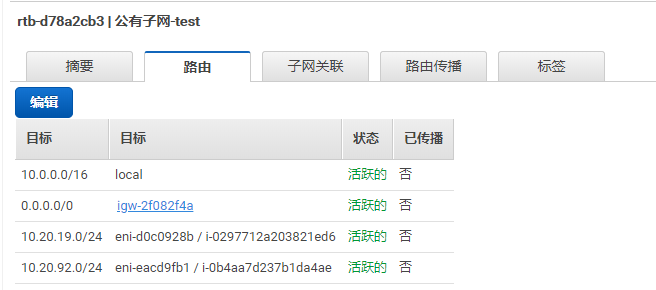
1.创建共有子网网络或私有网络(通过nat进行公网访问)
本例直接使用共有子网的VPC作为例子
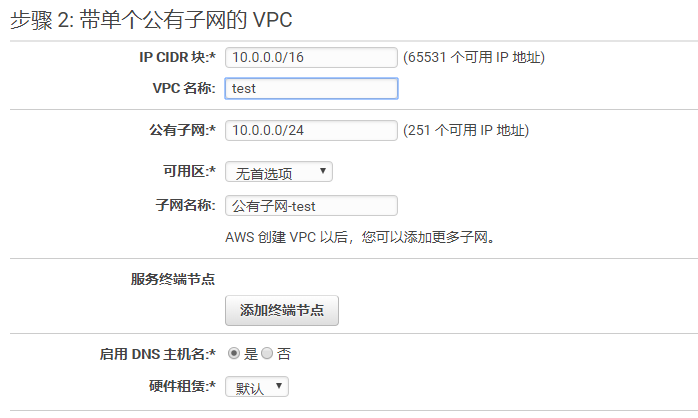
查看该VPC下的公有子网
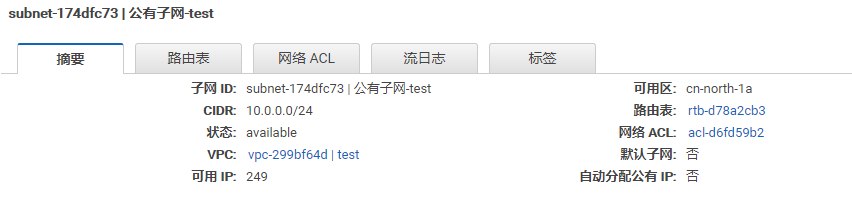
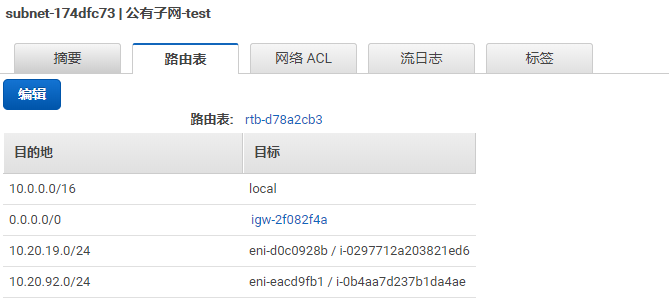
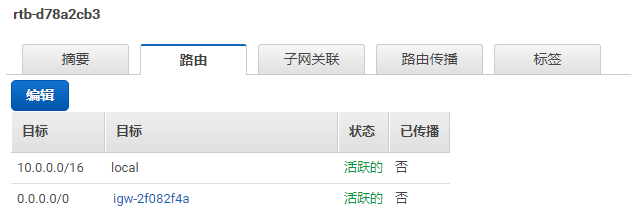
查看路由表:
2.创建IAM策略,需要的策略包含:
ec2:CreateRoute
ec2:DeleteRoute
ec2:ReplaceRoute
ec2:DescribeRouteTables
ec2:DescribeInstances
json示例如下:
{
  "Version": "2012-10-17",
  "Statement": [
    {
          "Effect": "Allow",
          "Action": [
              "ec2:CreateRoute",
              "ec2:DeleteRoute",
              "ec2:ReplaceRoute"
          ],
          "Resource": [
              "*"
          ]
    },
    {
          "Effect": "Allow",
          "Action": [
              "ec2:DescribeRouteTables",
              "ec2:DescribeInstances"
          ],
          "Resource": "*"
    }
  ]
}
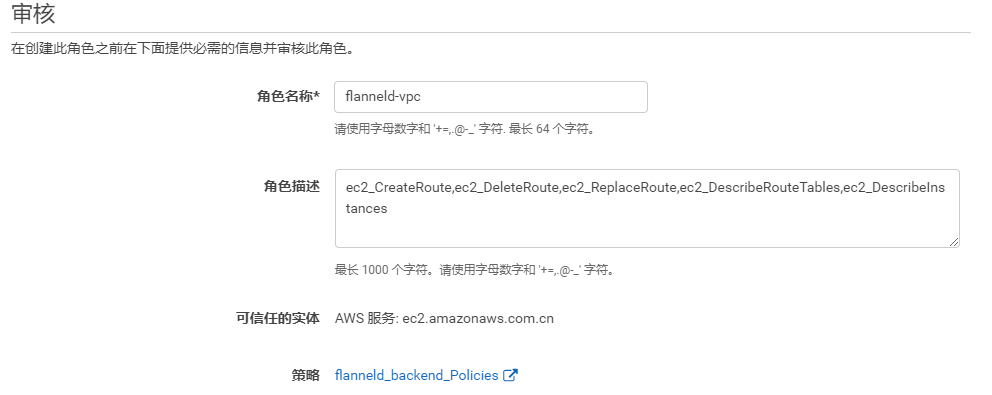
3.创建IAM角色
 4.启动实例
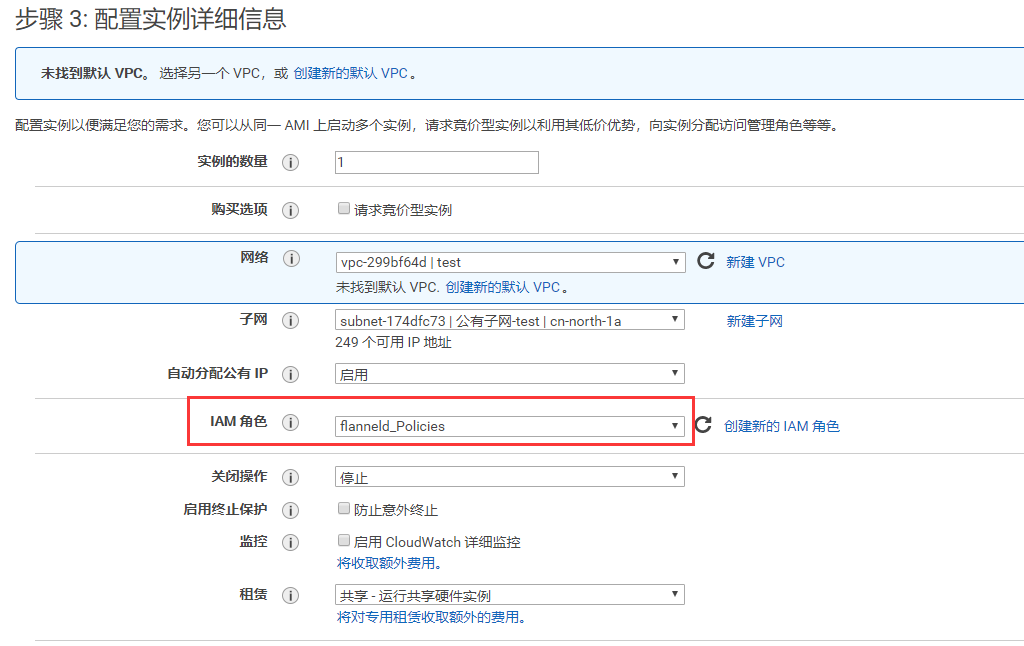
启动实例时需注意添加相应的IAM角色,以及对应的网络关系
 5.启动etcd (略)
6.在etcd创建flanneld配置
# etcdctl --endpoints https://127.0.0.1:2379 --ca-file=/etc/kubernetes/ssl/ca.pem --cert-file=/etc/kubernetes/ssl/kubernetes.pem --key-file=/etc/kubernetes/ssl/kubernetes-key.pem set /k8s/network/config '{"Network":"10.20.0.0/16", "Backend": {"Type": "aws-vpc", "RouteTableID": ["rtb-d78a2cb3"]} }'
查看flanneld日志
-- Logs begin at Wed 2018-03-14 07:21:58 UTC, end at Wed 2018-03-14 07:24:27 UTC. --
Mar 14 07:24:26 ip-10-0-0-156 systemd[1]: Starting Flanneld overlay address etcd agent...
Mar 14 07:24:26 ip-10-0-0-156 flanneld-start[992]: I0314 07:24:26.729055     992 main.go:475] Determining IP address of default interface
Mar 14 07:24:26 ip-10-0-0-156 flanneld-start[992]: I0314 07:24:26.729219     992 main.go:488] Using interface with name eth0 and address 10.0.0.156
Mar 14 07:24:26 ip-10-0-0-156 flanneld-start[992]: I0314 07:24:26.729232     992 main.go:505] Defaulting external address to interface address (10.0.0.156)
Mar 14 07:24:26 ip-10-0-0-156 flanneld[992]: warning: ignoring ServerName for user-provided CA for backwards compatibility is deprecated
Mar 14 07:24:26 ip-10-0-0-156 flanneld-start[992]: I0314 07:24:26.729934     992 main.go:235] Created subnet manager: Etcd Local Manager with Previous Subnet: None
Mar 14 07:24:26 ip-10-0-0-156 flanneld-start[992]: I0314 07:24:26.729941     992 main.go:238] Installing signal handlers
Mar 14 07:24:26 ip-10-0-0-156 flanneld-start[992]: I0314 07:24:26.730398     992 main.go:548] Start healthz server on 0.0.0.0:10752
Mar 14 07:24:26 ip-10-0-0-156 flanneld-start[992]: I0314 07:24:26.735723     992 main.go:353] Found network config - Backend type: aws-vpc
Mar 14 07:24:26 ip-10-0-0-156 flanneld-start[992]: I0314 07:24:26.735749     992 awsvpc.go:88] Backend configured as: %s{"Type": "aws-vpc", "RouteTableID": ["rtb-d78a2cb3"]}
Mar 14 07:24:26 ip-10-0-0-156 flanneld-start[992]: I0314 07:24:26.737197     992 local_manager.go:147] Found lease (10.20.19.0/24) for current IP (10.0.0.156), reusing
Mar 14 07:24:26 ip-10-0-0-156 flanneld-start[992]: I0314 07:24:26.889537     992 awsvpc.go:322] Found eni-d0c0928b that has 10.0.0.156 IP address.
Mar 14 07:24:26 ip-10-0-0-156 flanneld-start[992]: W0314 07:24:26.901262     992 awsvpc.go:134] failed to disable SourceDestCheck on eni-d0c0928b: UnauthorizedOperation: You are not author
Mar 14 07:24:26 ip-10-0-0-156 flanneld-start[992]: status code: 403, request id: 85c4be4a-cd2e-462b-997e-0a769641b9c6.
Mar 14 07:24:26 ip-10-0-0-156 flanneld-start[992]: I0314 07:24:26.901294     992 awsvpc.go:79] Route table configured: true
Mar 14 07:24:26 ip-10-0-0-156 flanneld-start[992]: I0314 07:24:26.901955     992 awsvpc.go:63] RouteTableID configured as slice: %+v[rtb-d78a2cb3]
Mar 14 07:24:27 ip-10-0-0-156 flanneld-start[992]: I0314 07:24:27.171475     992 awsvpc.go:256] Route added to table rtb-d78a2cb3: 10.20.19.0/24 - eni-d0c0928b.
Mar 14 07:24:27 ip-10-0-0-156 flanneld-start[992]: I0314 07:24:27.171596     992 main.go:300] Wrote subnet file to /run/flannel/subnet.env
Mar 14 07:24:27 ip-10-0-0-156 flanneld-start[992]: I0314 07:24:27.171603     992 main.go:304] Running backend.
Mar 14 07:24:27 ip-10-0-0-156 flanneld-start[992]: I0314 07:24:27.173365     992 main.go:396] Waiting for 22h59m59.564036054s to renew lease
Mar 14 07:24:27 ip-10-0-0-156 systemd[1]: Started Flanneld overlay address etcd agent.
Mar 14 07:24:27 ip-10-0-0-156 flanneld-start[992]: I0314 07:24:27.186893     992 iptables.go:115] Some iptables rules are missing; deleting and recreating rules
Mar 14 07:24:27 ip-10-0-0-156 flanneld-start[992]: I0314 07:24:27.186905     992 iptables.go:137] Deleting iptables rule: -s 10.20.0.0/16 -j ACCEPT
Mar 14 07:24:27 ip-10-0-0-156 flanneld-start[992]: I0314 07:24:27.187839     992 iptables.go:137] Deleting iptables rule: -d 10.20.0.0/16 -j ACCEPT
Mar 14 07:24:27 ip-10-0-0-156 flanneld-start[992]: I0314 07:24:27.188784     992 iptables.go:125] Adding iptables rule: -s 10.20.0.0/16 -j ACCEPT
Mar 14 07:24:27 ip-10-0-0-156 flanneld-start[992]: I0314 07:24:27.190336     992 iptables.go:125] Adding iptables rule: -d 10.20.0.0/16 -j ACCEPT
在aws控制台上查看路由表信息